Shifting Perspective from Drafting to Technical Publishing
In an era defined by minimalism and high performance, building a personal blog is no longer just about picking a pre-made platform. The modern trend is shifting decisively toward Static Site Generators (SSG). Hugo, when paired with the PaperMod theme, is more than just a tool; it is an optimized ecosystem designed to transform raw Markdown content into a polished digital product with near-zero latency.
Analysis of System Operational Flow
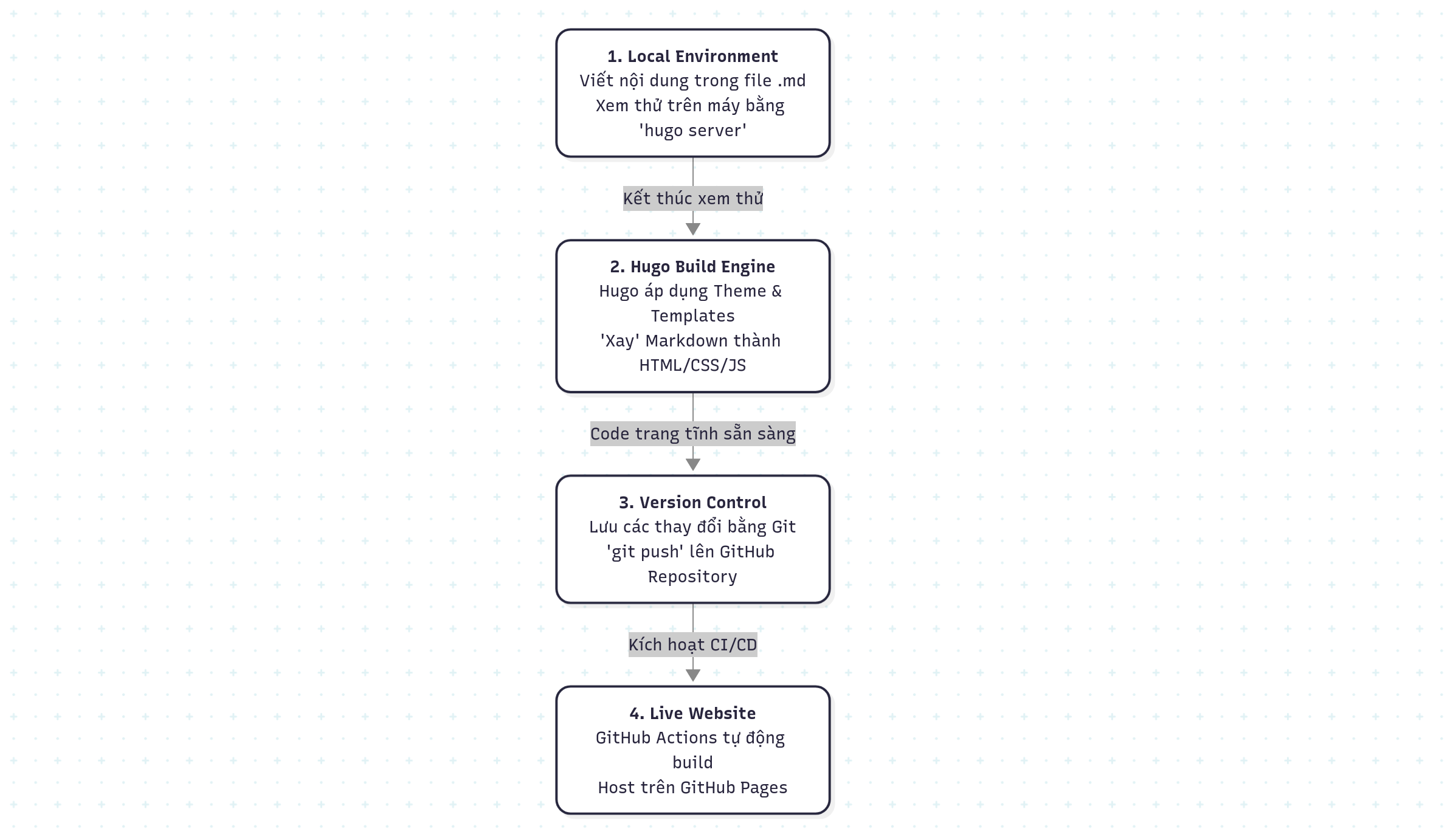
The journey from an idea to a live post on the internet is managed through a series of tightly integrated and consistent data processing layers.
 Figure 1: Data flow from the local environment to the end user via the GitHub Pages infrastructure.
1. Data and Metadata Layer (Front Matter)
Every content entity in Hugo begins with Markdown. However, the system’s coordination capability lies within the Front Matter. This is where metadata is stored to help Hugo define display logic, taxonomies, and SEO parameters.
Standard File Structure:
---
title: "Modern Blog Architecture"
date: 2026-03-06
tags: ["tech", "blog"]
categories: ["Architecture"]
draft: false
---

The article content starts here. Using **Markdown** allows for a complete
separation between the data layer and the presentation layer.
2. The Power of the Go-Based Compilation Engine
Hugo is developed using the Go programming language, leveraging parallel processing to achieve legendary compilation speeds. Instead of querying a database at the time of a user request (Runtime), Hugo performs the “Rendering” of the entire website at the time of the build (Build-time).
Lookup Order and Rendering Mechanism
Hugo operates based on a sophisticated Lookup Order and Template Inheritance system. The process unfolds in three stages:
- Parsing: Scans the
content/directory to analyze Markdown and extract Front Matter. - Mapping: Maps the content type to the most suitable Layout within PaperMod (e.g.,
single.htmlfor an individual post). - Injections: Uses the Go Template engine to inject data into predefined placeholders.
Visualizing the Data Injection Mechanism:
<article>
    <h1>{{ .Title }}</h1> <!-- Hugo retrieves the title from Front Matter -->
    <div class="meta">{{ .Date.Format "January 02, 2006" }}</div>
    <div class="content">
        {{ .Content }} <!-- Content rendered into HTML -->
    </div>
</article>
Real-world Performance Testing (Build Log):
Start building sites …
hugo v0.146.0+extended linux/amd64

Total in 85 ms
With this speed, Live Reload is virtually instantaneous, ensuring an uninterrupted creative workflow.
3. Shortcodes: The Bridge Between Markdown and HTML
To overcome the limitations of plain text while keeping Markdown files clean, Hugo utilizes Shortcodes. These are “macros” that allow for the embedding of complex UI components.
Example of Inserting a Figure with a Caption:
{{< figure src="/images/architecture.png" title="System Diagram" >}}
Example of a Custom Note Box Shortcode:
{{< note title="Insight" >}}
Using an SSG reduces the security attack surface because there is no server-side database.
{{< /note >}}
4. Full Automation with CI/CD (GitHub Actions)
A professional blog requires a reliable release process. When you execute a git push, GitHub Actions automatically triggers the compilation and deployment process to GitHub Pages.
Standard YAML Configuration:
jobs:
  build:
    runs-on: ubuntu-latest
    steps:
      - name: Checkout Source
        uses: actions/checkout@v4
      - name: Build Minified Site
        run: hugo --gc --minify
      - name: Deploy
        uses: actions/deploy-pages@v4
Technical Insights and Trade-offs
While Hugo and PaperMod offer superior performance, users must consider the following factors:
- Advantages: Extremely fast response times, near-perfect Google Lighthouse scores (100/100), high security, and content management via Git for perfect version history.
- Trade-offs: A steeper initial learning curve compared to drag-and-drop platforms. Deep customization requires basic knowledge of HTML and Go Templates.
The Key Takeaway: Performance issues often do not reside in image sizes, but in the system architecture itself. Choosing a “Static-first” architecture like Hugo is a strategic move to optimize the reader experience in the long term.
Explore more about custom CSS or advanced configurations in the upcoming articles.